

Remove PDF DRM Mac
How to Remove DRM from PDF eBooks Adobe Digital Editions on Mac?
I have 8 PDF files (e-books) that I downloaded and want to copy to my e-reader, but they’re all protected. I can open the original version but I can’t copy parts of the PDF nor the whole file. I’ve tried already 3 desktop freeware and about 5 online software and none worked. If anyone knows a way to unprotect “armoured” PDF files, please let me know. Thank you. 🙂
If you have bought Digital publications from Adobe Digital Editions and you want to read your eBooks on any device or eBook Reader then you must strip Adobe Adept DRM Protection to use them freely. Then, in the following guide, we will concentrate on a solution to remove remove DRM protection from encrypted PDF files on Mac or Windows.
PDF DRM Removal is an effective software to strip DRM protection from encrypted PDF eBooks on Adobe Digital Editions (ADE) with no quality loss. It creates a new e-book file without DRM limitation. The PDF DRM Removal will not damage the contents of the encrypted PDF files. After removing the DRM protection from PDF, you could read the PDF on any supported devices freely!

Now, you can follow the user tutorial to remove DRM for encrypted PDF files on Mac. Free download is available, just go the way to have a trial.
Supported OS: For Windows 10/8/7/Vista/XP; Mac OS X 10.10 and later
How to remove DRM from encrypted PDF files on Mac/Windows?
Step 1. Authorize Adobe Digital Editions on your computer
To read DRM-protected eBooks on your computer, you’ll need to authorize Adobe Digital Editions (ADE). To read the same eBooks on additional computers or devices, be sure to authorize each one with the same Adobe ID. You may authorize up to six computers and/or devices.
1. If you install and open ADE on your computer for the first time, you’ll be prompted to authorize ADE on your computer. Or you can go to Help > Authorize Computer to start the process manually.

2. If you have an Adobe ID, enter it along with your password.

If you don’t have an Adobe ID, you can get one on Adobe’s website by clicking Create an Adobe ID here.
Then, click “Authorize” button to have your computer authorized with your Adobe ID.
Note: If you choose to authorize your computer without an ID, you will still be able to view eBooks on your computer. However, you will not be able to transfer or download those titles to other devices.
Step 2. Import PDF to PDF DRM Removal
By default PDF DRM Removal is able to discover your purchased Adobe DRM protected PDF eBooks automatically, and you can see them in the right side library column on the program.
If the right side library column is empty, and you indeed synced your purchased Adobe DRM protected PDF books via Adobe Digital Editions. You can manually add them into the program.
1. Find the correct path of your synced Adobe DRM protected PDF books.
Run Adobe Digital Editions, if you have synced books via this program, you will see the books listed in the main interface, right click on the cover and choose “Show File in Finder”, then you you can see where the file is saved.

2. Add books into PDF DRM Removal
Launch PDF DRM Removal software, click “Adobe” tab, it will automatically detect your PDF ebooks saved in ADE’s default folder and display them on the left column of the software.

Or you can drag the DRM-ed PDF files into the program’s interface manually. The DRM will be decrypted automatically when you’re loading the PDFs.
Step 3. Removing DRM from PDF eBooks on Mac
Double click the PDF files to remove DRM protection from PDF ebooks swiftly. Or just simply drag and drop the PDF books you want to decrypt from the library right side to the main interface, the PDF eBooks DRM protections will be removed automatically.
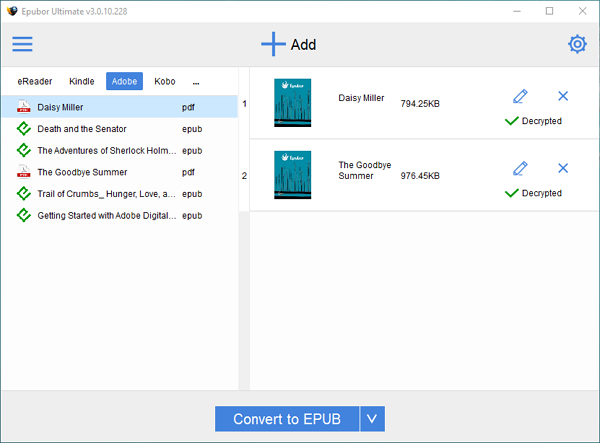
Then, click “Decrypted” button you can find the DRM free ebooks in the new folder.

Useful Tips:
1. The default location of ADE:
- For Windows: …\My Documents (or Documents)\My Digital Editions\…
- For Mac: Users/ … (Your computer name)/Digital Editions/…
2. Problem with authorizing ADE:
An error “problem decrypting session key” may occur if you use different ADE versions to download ACSM files or open eBooks. In this case, you have to delete all your downloaded books under your ADE folder and re-download them with the authorized Adobe ID again.
3. Win 7 or Vista users:
If you are using Win7 or Vista, please right click on the program icon and choose “run as administrator”.